


Product Description

Effortlessly smart and intuitively simple, Samsung Galaxy S III is a new smartphone concept. It is the most human mobile device ever made.
It sees, listens, responds. It's personal. But it's for everyone. And it marks an incredible new generation of mobile phones.
Inspired by nature: the GALAXY S III's minimal and organic design is reflected in its smooth and non-linear lines of the device. Its human-centric nature provides an ergonomic and comfortable experience with enhanced usability.

With the Samsung Galaxy S III, you can view content like never before on a 4.8 inch HD Super AMOLED display, whilst an 8MP camera and an 1.9MP front camera offer a variety of intelligent camera features and face recognition related options so you can capture all moments easily and instantly. The Samsung Galaxy S III is powered by Android 4.0 Ice Cream Sandwich and full of intuitive technology, delivering a uniquely personalised mobile experience.

Smart thinking - Adapting to the way you surf
Smart Stay
With the innovative Smart Stay feature, GALAXY S III automatically recognizes when you are looking at the phone, whether it is to read an e-book or browse the web. The front camera looks deep into your eyes and maintains a bright display for continued viewing pleasure. What a bright idea.
Direct Call
Samsung GALAXY S III even knows when you want to talk. When you are messaging someone and decide to call them instead, simply lift the phone to your ear and Direct call will dial their number for you. No more fumbling through call logs or contacts. Let GALAXY S III do the work.
Pop-up Play
Picture-in-picture technology lets you watch a video and do other tasks, like sending emails, or surfing the web at the same time.
S-Beam
Sharing your content with friends nearby should be easy, quick, and even fun. S Beam lets you bond instantly so you can transfer documents, contacts, pictures, music, videos, you name it. Just put the backs of your phones together, connect, share and enjoy.
 Designed for humans isn't just a marketing headline. It really does sum up how you'll experience a phone that is unlike anything out there. Here are the key features: 
Social Tag
Now it's even easier to keep track of friends and loved ones. Social Tag lets you link the faces in your photo album with their social media streams. Once it's set, all you have to do is look at their pictures and you'll see their current status appear.
Best Photo
The GALAXY S III can take first of eight shots at once and then recommends the best one. Increasing the chance of a great shot every time.

S-Voice
Why not get a response from your phone? Tell it to wake up! Even better, you can tell GALAXY S III to turn off the alarm for a few minutes and let yourself sleep a bit more. Answer your phone (or reject a call), turn your music up (or down) and even tell the camera to load.

Smart Alert
When you pick up your phone, wouldn't it be nice if it let you know what has been happening since you've been gone? The GALAXY S III knows you came back and gives you a brief vibrating nudge to inform you about missed calls and new messages. How thoughtful is that?

AllShare Play
There's another way to share content on various devices. It's called AllShare Play, and it lets us work together through the magic of DLNA and Wi-Fi Direct, giving us remote access to documents and multimedia files when we work on a different screen somewhere else.

Buddy Photo-share
It couldn't be easier to manage and share your photos. The phone recognizes faces and links those for you, using your group profiles for guidance. Now you're once touch away from sharing with everyone instantly.
|
Tuesday, January 8, 2013
Samsung Galaxy S III
Tuesday, August 28, 2012
BlackBerry Curve 9320

The BlackBerry Curve 9320 is a classic BlackBerry smartphone. It's light and easy to use and professional to look at. The built-in QWERTY keyboard is well laid out and quick to type on, there's great battery life, the awesome BBM Music and of course BlackBerry Messenger. It is only 99 grams and it's a phone just under 100 grams. The storage capacity is 512MB but you can extend it with a micro SD card up to 32GB! With the micro USB Cable upload songs, pictures, videos and much more! With the 3.2 megapixel camera capture still photos to share with your family and friends! It is priced as only under £150 pounds

Great design for ease of use and portability
Staying in touch is fast and easy with the BlackBerry QWERTY keypad;it's been designed to make it intuitive to use so you know where the right keys are when you're typing a message on Facebook or replying to an email. The sleek and professional design is lightweight and slim so it fits in your pocket easily letting you stay in touch on the go.

BlackBerry Messenger and social apps
Talk to a group of friends or one-to-one. BBM happens in real time so you know when your messages have been delivered and read; it's just like a conversation and it's completely private. There's also a dedicated BBM hot key letting you jump straight to your BBM home screen in a second. And with BBM built right into apps, you can chat and stay connected with friends while your playing games, checking sports news or just catching up while reading the news.

BBM Music and FM radio
Share your favourite music with your friends and discover what music they're into. Just like BBM, BBM music is unique to BlackBerry; invite your BBM friends to join BBM music to share, compare and grow your music collections. Fancy something more random? Listen to your favourite radio stations for the latest tracks and news. Or, grab some radio apps like Tune In Radio and Nobex Radio Companion to really max out your radio experience.

Battery life, processing power and fast internet
The powerful battery has plenty of playback and talk time to keep you connected to what's important all day. Moving between apps and connecting to social networks are all done quickly with a faster processor to give great performance. Hate waiting for web pages to load? The BlackBerry web browser is smooth and fast and you can see all of the web. Your smartphone can even share its internet connection with up to five other devices.

Your social networking companion
See all of your social network updates and messages, as they arrive, in one place with Social Feeds. Everything you need to stay in touch with is in one place so you'll never miss an update or an invitation. Stay on top of your social life with the Facebook app for BlackBerry or be on top of trends with the BlackBerry Twitter app.

Capture your memories
Whether you're out on the town with your mates or spot a celebrity on the street, your BlackBerry Curve 9320 is there to capture the moment. You can even share it wirelessly. You can post the picture in a couple of clicks to Facebook, Twitter or any other social network, or friends and family can enjoy the moment with you by viewing it on a TV which supports the universal Plug and play [uPnP] standard. If you're looking for a super portable phone that's ideal for messaging, keeping up to date with your social life and playing your tunes, look no further than the BlackBerry Curve 9320.

Browse easily and share your connection
The BlackBerry Curve 9320 has 3G built in, which means web pages will load faster and you'll enjoy smoother browsing. So you'll be able to find what you're looking for without frustrating delays. You can also choose to join a Wi-Fi network - and you can even turn your phone into a Wi-Fi hotspot that can connect up to five devices at once, which is great for sharing when you're out and about .
|
Tuesday, June 12, 2012
Apple iPhone 5
 Respected Japanese Apple blog Macotakara has allegedly received word from "Asian sources" who claim that Apple will launch the device in September or October 2012 which would fit with last year’s arrival of the iPhone 4S.
"According to Asian reliable source, next iPhone will be released in September or October, and this cycle seems to be kept for years," read a translated portion of the report.
If the article proves to be accurate, it would mean the company is returning to the 12-month launch cycles we saw for the first four versions of the beloved device.
Last year's October iPhone 4S launch was the only time Apple has verged from the summer cycle, making users wait 15 months instead of the usual 12 for a new handset.
While the iPhone 4S was more of an evolutionary upgrade, with a faster processor an improved camera and the addition of the Siri voice control app, the iPhone 5 is likely to bring a more revolutionary approach, perhaps with the addition of a 4G LTE internet and a larger screen size.
The 16GB iPhone 4S lines up in retailers with a hefty £499 price tag. Prices continue up all the way to £699 for the 64GB edition. Ahead of the iPhone 4S successor’s announcement, it is believed that the sixth-gen model will simply replace the iPhone 4s in terms of price points and range of models with any 128GB storage option likely to hit the £799 price mark. 
Following the March launch of the new iPad, eports have suggested that Apple is to cease the numbered naming convention of its pocket blowers and move the market leading iPhone range in line with its Mac offerings which see multiple product overhauls occur whilst maintaining the same base name.
“About two weeks ago we got a tip from a reliable source that Apple was going to call the iPhone 5 the new “iPhone,” according to Apple blog 9to5Mac.
“That seemed a little nuts at the time but what a difference a Keynote makes. Apple chopped the suffix off if the iPad as part of a branding makeover that will likely expand.
The report added: “Just like iMac is not called iMac 1,2,3 it looks like Apple won’t be doing the numbering on iOS devices (though it never did with the iPod touch).”
Display 
Update: Apple has reportedly begun manufacturing on its rumoured iPhone 5 handsets. Reports suggest Sony has been working on display components for the Californian company’s next-gen smartphone since February – and will ramp up production on the panels at the end of this month.
According to AppleInsider, the consumer electronics manufacturer is working in conjunction with other firms, such as Toshiba Mobile Display and LG Display Co, to roll out enough panels for the heavily rumoured device, expected to launch later this year.
Stone Wu, a senior analyst at IHS Displaybank, said: “Even for those companies that start mass production in May, they can only reach an average yield of 65 to 70 per cent at present.”
Although there has been no official word on the iPhone 5’s screen size, rumours suggest growing competition and market pressures will see Apple introduce a new plus 4-inch model.
These rumours have been backed up by a selection of industry analysts that have suggested Apple will be forced into the screen size overhaul as competition from rival handsets, such as the Samsung Galaxy S3, intensify.

Speaking with T3, industry specialist Daniel Ashdown from tech analysis company Juniper Research suggested Apple may opt for a larger screen for the iPhone 5.
He said: "It will be particularly interesting to see what the size of the display will be given that it has not changed thus far since the iPhone was launched with a 3.5-inch screen.
"Competitors have increased their devices to up to 4.3". We would be surprised if they [Apple] didn't break from tradition this time and increase the size of the next model."
Contrary to these claims, other reports have suggested Apple will retain its 3.5-inch iPhone display for future handsets as a larger screen could disturb the iOS platform’s offering of apps.

Specs
Update: The key reason for current users to upgrade to an iPhone 5 later this year will be a 'sleek unibody casing', according to an industry analyst.
In a note to investors, Brian J. White of Topeka Capital Markets reckons
production will begin on a new 4-inch iPhone in June this year,
following a recent visit to suppliers in Taiwan and China, AppleInsider reported.
He says the sixth generation iPhone device will boast a look similar to
the single sheet aluminium casings featured on recent iterations of the
Apple MacBook Pro and MacBook Air lines.
He wrote: "In our view, this will be the most significant iPhone upgrade with a four-inch screen and a new, sleek look that we believe will require a Unibody case.
“This new, sleek look will be the most important reason that consumers decide to upgrade."
Meanwhile, despite the on-going legal battles between the two companies
over repeated patent infringements, Samsung looks set to continue its
role as a component supplier for Apple’s iDevices.
The Korean firm is reported to be providing the quad-core A6 chips to feature within the iPhone 5.
“Apple has been in talks with Samsung over shipment of its A6 quad-core mobile processor (AP) chips to be used in the next iPhone,” sources told KoreaTimes.

They added: “It appears that Apple clearly has concluded that Samsung remains a critical business partner.”
Meanwhile, further reports have suggested Apple is to shave millimetres off the form of its next-generation handset thanks to the introduction of a new streamlined Sony camera sensor.
Whilst handsets and tablets continue to ship with increasingly slim form factors, the lack of cut sized camera sensors has started to slow the possibilities of even slimmer devices.
Sony, however, has announced a new back-illuminated CMOS sensor tipped for inclusion within the Apple iPhone 5 that will allow for increasingly thin designs with improved functionality.
"This image sensor layers the pixel section containing formations of back-illuminated structure pixels onto chips containing the circuit section for signal processing, which is in place of supporting substrates for conventional back-illuminated CMOS image sensors," the component's description declared.
"This structure achieves further enhancement in image quality, superior functionalities and a more compact size that will lead to enhanced camera evolution.”

Design
Update: The next generation Apple iPhone 5 could appear longer and thinner, with a widescreen aspect ratio, reports suggest.
9to5Mac has received word from its sources that the company will launch the device with a 3.999-inch screen (diagonally) with a resolution of 640 x 1136, compared to the existing 640 x 960, 3.5-inch offering.
The width of the screen will remain the same, but the device would be longer, if the article is correct. This contradicts claims that the Californian firm will include a 4-inch screen on the rumoured device.
The Apple news site says it knows of two prototype iPhone 5 devices currently being tested, both of which sport the new screen size.
A key advantage of the new aspect ratio, which is close to 16:9, will be full-screen native video, but 9to5Mac reckons the company is planning to integrate an extra row of app icons on the homescreen, making five in total.
It'll also allow for "extended application user interfaces that offer views of more content," according to the report.
The site added that it also believes current plans will see a smaller, redesigned dock connector, which will eventually graduate to all iOS devices.
Other reports have claimed something similar.

Last year, The Wall Street Journal reported that its 'in-the-know' contact believes the iPhone 5 will feature a “different form factor”, adopting a brand new design following the antennagate issues that resulted in signal problems with the iPhone 4.
Since then Engadget has spoken to multiple sources who claim that a complete redesign of the handset body is on the cards and that the device is already being tested by staff at Apple HQ.
Also on the cards for the iPhone 5 is an all-metal back, similar to that found on the original iPhone, reportedly in a bid to avoid the embarrassing antenna issues experienced on the iPhone 4.
The glass posterior of the iPhone 4 was also prone to unsightly cracks if treated roughly, and was rumoured to be the cause of the delay of the white model - a headache all round for Apple.
An Apple patent also points to the iPhone using smaller conductive nodes beneath the screen, allowing for the overall device to be slimmer.
Camera

New reports have suggested the iPhone 5 will land with a high-spec 3D snapper.
In fact, Cupertino-based Apple is also expected to include the hardware in all of its upcoming mobile devices, TrustedReviews reports.
In March, the Apple-dedicated site Patently Apple published details of what it claims to be of a patent registered by Apple. The patent outlines a 3D imaging camera that will reportedly allow users to make use of advanced micro lenses to add visual depth to extra-dimensional snaps.
A post on the site reads: “Apple has invented a killer 3D imaging camera that will apply to both still photography and video.
“The new cameras in development will utilize new depth-detection sensors such as LIDAR, RADAR and Laser that will create stereo disparity maps in creating 3D imagery.
“Additionally, the cameras will use advanced chrominance and luminance Sensors for superior color accuracy.”
We’re not sure what to make of a 3D camera, purely because we’ve played with them before and had mixed opinions.
But then again, this is Apple, so we could possibly see something remarkably new (and improved) than the lacklustre 3D kit found in, say, the Nintendo 3DS (please don’t shoot us!).
|
Wednesday, May 23, 2012
Apple iPhone 4S
  16GB,32GB,64GB 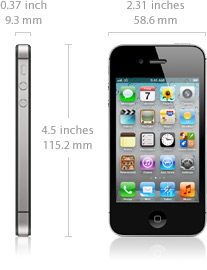 Height: 4.5 inches (115.2 mm) Width: 2.31 inches (58.6 mm) Depth: 0.37 inch (9.3 mm) Weight: 4.9 ounces (140 grams) 
Cellular and Wireless :
World phone
UMTS/HSDPA/HSUPA (850, 900, 1900, 2100 MHz);
GSM/EDGE (850, 900, 1800, 1900 MHz)
CDMA EV-DO Rev. A (800, 1900 MHz)4
802.11b/g/n Wi-Fi (802.11n 2.4GHz only)
Bluetooth 4.0 wireless technology

Location :
Assisted GPS and GLONASS
Digital compass
Wi-Fi
Cellular

Display :
Retina display
3.5-inch (diagonal) widescreen Multi-Touch display
960-by-640-pixel resolution at 326 ppi
800:1 contrast ratio (typical)
500 cd/m2 max brightness (typical)
Fingerprint-resistant oleophobic coating on front and back
Support for display of multiple languages and characters simultaneously

Camera, Photos, and Video :
8-megapixel iSight camera
AutofocusTap to focus Face detection in still images LED flash Video recording, HD (1080p) up to 30 frames per second with audio Video stabilization Front camera with VGA-quality photos and video at up to 30 frames per second Photo and video geotagging
External Buttons and Controls
Connectors and Input/Output
 
Power and Battery :
Charging via USB to computer system or power adapterBuilt-in rechargeable lithium-ion battery Talk time: Up to 8 hours on 3G, up to 14 hours on 2G (GSM) Standby time: Up to 200 hours Internet use: Up to 6 hours on 3G, up to 9 hours on Wi-Fi Video playback: Up to 10 hours Audio playback: Up to 40 hours Audio Playback : Frequency response: 20Hz to 20,000Hz
Audio formats supported: AAC (8 to 320 Kbps), Protected AAC (from iTunes Store), HE-AAC, MP3 (8 to 320 Kbps), MP3 VBR, Audible (formats 2, 3, 4, Audible Enhanced Audio, AAX, and AAX+), Apple Lossless, AIFF, and WAV
User-configurable maximum volume limit TV and Video : AirPlay Mirroring to Apple TV support at 720p AirPlay video streaming to Apple TV (3rd generation) at up to 1080p and Apple TV (2nd generation) at up to 720p Video mirroring and video out support: Up to 1080p with Apple Digital AV Adapter or Apple VGA Adapter (adapters sold separately)
Video out support at 576p and 480p with Apple Component AV Cable; 576i and 480i with Apple Composite AV Cable (cables sold separately)
Video formats supported: H.264 video up to 1080p, 30 frames per second, High Profile level 4.1 with AAC-LC audio up to 160 Kbps, 48kHz, stereo audio in .m4v, .mp4, and .mov file formats; MPEG-4 video up to 2.5 Mbps, 640 by 480 pixels, 30 frames per second, Simple Profile with AAC-LC audio up to 160 Kbps per channel, 48kHz, stereo audio in .m4v, .mp4, and .mov file formats; Motion JPEG (M-JPEG) up to 35 Mbps, 1280 by 720 pixels, 30 frames per second, audio in ulaw, PCM stereo audio in .avi file format 
Headphones :
Apple Earphones with Remote and Mic
Frequency response: 20Hz to 20,000Hz
Impedance: 32 ohms
Mail Attachment Support :
Viewable Document Types : .jpg, .tiff, .gif (images); .doc and .docx (Microsoft Word); .htm and .html (web pages); .key (Keynote); .numbers (Numbers); .pages (Pages); .pdf (Preview and Adobe Acrobat); .ppt and .pptx (Microsoft PowerPoint); .txt (text); .rtf (rich text format); .vcf (contact information); .xls and .xlsx (Microsoft Excel)
Environmental Requirements : Operating temperature: 32° to 95° F (0° to 35° C) Nonoperating temperature: −4° to 113° F (−20° to 45° C) Relative humidity: 5% to 95% noncondensing Maximum operating altitude: 10,000 feet (3000 m) Languages : Language Support
English (U.S.), English (UK), Chinese (Simplified), Chinese (Traditional), French, German, Italian, Japanese, Korean, Spanish, Arabic, Catalan, Croatian, Czech, Danish, Dutch, Finnish, Greek, Hebrew, Hungarian, Indonesian, Malay, Norwegian, Polish, Portuguese, Portuguese (Brazil), Romanian, Russian, Slovak, Swedish, Thai, Turkish, Ukrainian, Vietnamese
Keyboard Support
English (U.S.), English (UK), Chinese - Simplified (Handwriting, Pinyin, Stroke), Chinese - Traditional (Handwriting, Pinyin, Zhuyin, Cangjie, Stroke), French, French (Canadian), French (Switzerland), German (Germany), German (Switzerland), Italian, Japanese (Romaji, Kana), Korean, Spanish, Arabic, Bulgarian, Catalan, Cherokee, Croatian, Czech, Danish, Dutch, Emoji, Estonian, Finnish, Flemish, Greek, Hawaiian, Hebrew, Hindi, Hungarian, Icelandic, Indonesian, Latvian, Lithuanian, Macedonian, Malay, Norwegian, Polish, Portuguese, Portuguese (Brazil), Romanian, Russian, Serbian (Cyrillic/Latin), Slovak, Swedish, Thai, Tibetan, Turkish, Ukrainian, Vietnamese
Dictionary Support (enables predictive text and autocorrect)
English (U.S.), English (UK), Chinese (Simplified), Chinese (Traditional), French, French (Canadian), French (Switzerland), German, Italian, Japanese (Romaji, Kana), Korean, Spanish, Arabic, Catalan, Cherokee, Croatian, Czech, Danish, Dutch, Estonian, Finnish, Flemish, Greek, Hawaiian, Hebrew, Hindi, Hungarian, Indonesian, Latvian, Lithuanian, Malay, Norwegian, Polish, Portuguese, Portuguese (Brazil), Romanian, Russian, Slovak, Swedish, Thai, Turkish, Ukrainian, Vietnamese
Siri LanguagesEnglish (U.S., UK, and Australian), French, German 
In the Box :
iPhone 4S
Apple Earphones with Remote and Mic
Dock Connector to USB Cable
USB Power Adapter
Documentation
|

Monday, November 28, 2011
BlackBerry Bold 9900
 The Bold 9900 brings back the wide body of the original Bold (left), in a much sleeker design Having used and reviewed a LOT of BlackBerry Smartphones over the years, it only took a few minutes with the Bold 9900 in hand to realize this is the best BlackBerry RIM has built. Within the BlackBerry family of smartphones, the Bold brand is positioned as the premium offering, representing the best of everything BlackBerry, and more than any Bold before it, the 9900 lives up to its name. While the Bold 9000 definitely made a bold statement with its sizeable dimensions and big keyboard, the abundance of plastic-chrome and faux-leather trimmings yielded an image of a BlackBerry that was blinged up in cheap jewelry. Don't get me wrong, it was still eye-catching and probably my favorite-designed BlackBerry up until the 9900, but it felt more like feigned luxury. With the next generation BlackBerry Bold 9700/9780 (and Tour 9630/Bold 9650 for that matter), RIM took a more conservative approach - downsizing the Bold to be more Curve-like in stature, and going with styling that while tasteful, was maybe a bit too understated to be considered Bold.  The new BlackBerry Bold 9900 exemplifies what the Bold brand is about - luxury by design. The 9900 makes a welcome return to the wide-body design of the original 9000, but in a much sleeker package that makes use of premium materials throughout. Goodbye plastic-chrome, hello metal! With the addition of a touchscreen on the outside and hardware platform upgrades on the inside that deliver more performance than we've ever seen from a BlackBerry Smartphone, this is the BlackBerry Bold we've been waiting for.  Appearance, Form Factor, Build Quality  The iconic BlackBerry design, updated with a touchscreen. Notice how the phone looks like its smiling? At BlackBerry World I attended a media briefing conducted by RIM's senior VP of Industrial Design, Todd Wood, who walked us through the creative process and design philosophy behind the BlackBerry Bold 9900. It was interesting to learn that before the designers get to the fun part of modeling, it all begins with the "product inspiration board." The inspiration board Todd showed us for the 9900 targeted a fictitious urban male in his 30s and the other kinds of products he owned. On the board and inspiring the design team for the 9900 were other classically luxurious products including a BMW sedan, a Panerai watch (the exact same model that appears in a few of the photos in this review actually!) and Prada leather boots. By infusing that inspiration with a respect for BlackBerry's own lineage, many iterations of design later the BlackBerry Bold 9900 were born. Knowing the inspiration behind the Bold 9900, its readily apparent that RIM succeeded in their design goals. The Bold 9900 oozes luxury and feels more like a quality product than an electronic gadget. At 10.5mm, it's the thinnest BlackBerry to date, and also the most solid. A big part of the reason for this solid feeling is the brushed stainless steel band that surrounds the perimeter of the phone, adding a touch of class (and no, I didn't see an iPhone 4 on RIM's design inspiration board!). In the hand, the Bold 9900 feels great. At 4.59oz (130g), it weighs less than you expect it to, and the width is perfect for a phone with a full physical keyboard. With its "PopTart" like shape, the overall footprint of the phone is fairly large, even when compared to the Bold 9780, but thanks to its thinness I've found the 9900 to still be easily pocketable in the front of my jeans. At a glance, from the front the Bold 9900 actually looks a lot like the original Bold 9000, with the update from the trackball to trackpad being the most immediately noticeable difference. Closer inspection reveals many other subtle changes. Below the display, now gone is the color from all buttons. The keypad buttons went all white on the Bold 9700, and now the Send/End keys have lost their green and red coloring. Aesthetically, I love the change.  The glass composite door looks high tech. It's a bit easy to smudge, but we're digging it. Above the keyboard (which we'll talk about more in a bit) is the expected row of BlackBerry controls, which allow for the one-handed navigation experience BlackBerry owners like myself value so much. Instead of individual buttons, the Send, Menu, Back and End keys are all part of the same piece, with the trackpad centered in the middle.The trackpad on the Bold 9900 has received an awesome update - it now lights up in the dark! Taking things to a new level, RIM's designers worked with the engineering team to even design the power-off sequence of the Bold 9900. When the backlighting times out, first the keyboard dims off, followed by the display, then the BlackBerry navigation buttons and finally the trackpad. It's an awesome effect. One less-awesome thing about the trackpad to be mindful of is its close proximity to the display. Now that there's a touchscreen, if you're sloppy with your trackpad up scroll you could find yourself accidentally swiping on the screen without wanting to. I wouldn't call this a problem by any means, but it might take some re-adjustment if you've been using a non-touchscreen BlackBerry and have been swiping onto the display all this time. Above the navigation is the new touchscreen display, and above that on the top right is the good ol' crack light - the blinking LED. The LED on the Bold 9900 is now circular in design, vs. the more rectangular design on previous Bolds. The back of the BlackBerry Bold 9900 is stylish yet functional. The outer perimeter receives soft-touch rubber treatment, which aids in gripping the phone. The battery door has a high-tech carbon fiber look to it, and is made of a composite glass material RIM developed that is friendly to RF transmission (actual carbon fiber is not). I like the look of the battery door a lot. My only complaint is that it's easy to smudge and can make the phone a little bit slippery if you're holding it in such a way that you're not making contact with the soft touch rubber. The battery door holds on tight and is pried off from the bottom where there's a little gap, which also serves as the audio port where sounds emerge from the phone.  Brushed stainless steel looks great and makes the Bold 9900 feel solid. Even the buttons are metal. The usual buttons and ports surround the perimeter of the BlackBerry Bold 9900. The right side of the phone has the standard volume up and down keys, with the mute key relocated from the top of the phone to be in between the volume keys. They serve double duty as media keys when playing music as well, for skipping tracks and play/pause. At the bottom right is the programmable convenience key.  The left side of the Bold 9900 features two ports. At the top is the 3.5mm headset jack, and below that is the microUSB port for syncing and/or charging. Because the port is cut into the stainless housing, it makes for a nice snug fit on the connector, eliminating the sloppiness we've noticed in the past on some models.  At the top of the phone is a single button, for locking/unlocking the screen. Centered at the top of the phone is a single button for locking and/or unlocking the screen. At the bottom are two contact points for the BlackBerry Charging Pod, which are mounted on a thin plastic strip which spans across the bottom. The brushed-plastic here is done so well I just assumed it was also metal.  Under the battery door, RIM has engineered things to fit nice and tight, with room left for the removable battery, microSD memory card and SIM card. My only gripe here is that unlike the Bold 9700/9780, you can't insert or remove the memory card while the battery is in the phone. If you try and remove the microSD card while the battery is in place, you'll find yourself wedging the card into the battery, which puts you in a difficult situation (watch this video to see what happens!).  This really is an exceptional BlackBerry from RIM. I love the design and style direction they've taken with the Bold 9900. From a hardware and manufacturing standpoint, it's the best I've seen. Over the years I've had a habit of ensuring my BlackBerrys are Made in Canada units, but the four Bold 9900s I bought and unboxed were all Made in Mexico and seem pretty perfect. As for durability, I think the Bold 9900 should be able to stand up pretty well. During the filming and videoing for this review I managed to drop it a couple times -- once from chest height onto a hardwood floor - and the 9900 emerged unscathed. Processor / Chipset / Performance  All of the newly-announced BlackBerry 7 Smartphones, including the BlackBerry Bold 9900, are running the Qualcomm Scorpion MSM 8655 processor clocked at 1.2GHz on the Snapdragon chipset. An Adreno 205 GPU (graphics processing unit) is also onboard, powering BlackBerry 7's hardware-accelerated graphics, which RIM has dubbed "liquid graphics." At 1.2GHz, the processing power is roughly double the speed of previous generation BlackBerry Bolds. In addition to more speed, this hardware platform upgrade addresses a lot of the other nagging wants we've had for a while now, including 3D graphics support (has been lacking to date on GSM BlackBerrys), HD video recording and more. While there may be faster processors and even dual-core phones on the market already on other platforms, when it comes to the BlackBerry OS I don't think what matters is the exact spec -- be it 1GHz, 1.2Ghz 1.4Ghz, etc. - but rather the experience it delivers. And 1.2Ghz on the BlackBerry OS is like injecting it with steroids. It actually took some getting used to the overall snappiness of phone and responsiveness of touchscreen. Honestly, it almost felt too fast at first, until I adjusted. Basic OS tasks like opening and closing apps are instant for the most part, and in five days of use I really haven't experienced any sort of hiccups or slow downs. The only time I've really seen the evil hourglass is while installing apps from App World, but even then I've been able to continue to use the phone. It honestly has been a night and day difference compared to my Bold 9780, which even on the most recent OS builds has been running slow and hourglassing like crazy as of late. Some things still take some time on the Bold 9900, like booting up the phone after a battery pull, but so far I have yet to experience the need to be forced to pull the battery. Between the hardware and BlackBerry 7 software, everything seems to be running smooth so far. I hope this speed holds up as I get out of review mode and into even more real world use (I'm curious to see how it performs after I turn the wireless connection back on after being on a four flight - an action which normally makes my 9780 unusable for a few minutes). I'm thinking it also might be time for another BlackBerry Stress Test! Stay tuned for that. Keyboard / Typing  Best. Keyboard. EVER. Seriously. The previous holder of this title was the keyboard on the original Bold 9000, which I thought was unbeatable, yet RIM managed to improve upon it. The Bold 9900's keyboard is actually 5% wider than the 9000's keyboard, and the keystroke itself has improved. It takes very little pressure to press a key down, yet the rebound is still extremely fast. The keys make that definite click action and sound, which help you get into a great typing rhythm. If you want to experience something magical, try typing on the BlackBerry Bold 9900's keyboard.  I actually upgraded Miss CrackBerry from her Bold 9700 to the Bold 9900, and having never having experienced the original Bold 9000's keyboard she was absolutely blown away the ease and speed of typing on the 9900. Her exact words were, "It's like typing on air... or clouds, yeah, it's like typing on puffy clouds." Not exactly the most technical reaction, but she made me realize a good point. The keyboard on the Bold 9900 isn't exhausting. I've pounded out some super long emails on the Bold 9900 now, and by the end my fingers don't feel like they've put out any effort, which hasn't been the case for me on previous BlackBerry keyboards. If you spend any significant amount of time each day on your phone sending emails, texts, tweets, Facebook messages, BBMs, etc., do yourself a favor and try out the keyboard on the Bold 9900. Your thumbs will thank you. Touchscreen Display Adding a touchscreen to the iconic BlackBerry design adds to the overall user experience Finally! It's almost comical to think about how long it took RIM to get a touchscreen into the traditional BlackBerry form factor, but it's finally here. It's responsive, it's smooth and it really adds to the overall usability of the device. After a few days on the 9900 I picked up my Bold 9780 again, and literally within seconds found myself tapping the screen and cursing that it didn't have a touchscreen. Oh, how the times have changed! In addition to touch functionality, the display itself received a nice bump in physical size, color and resolution, from the previous generation of Bold. The BlackBerry Bold 9900's 2.8-inch (diagonal) 24-bit display runs VGA at 640 x 480 pixels, for 287ppi. By comparison, the Bold 9780's 2.44-inch display delivers half VGA at 480 x 360. The BlackBerry Bold 9900's display really is nice. Colors are crisp and vivid, and the display is bright - even at the default 70 percent setting. RIM tells us the display is made of "extra hardened glass," so there's no plastic here. Now that we have a touchscreen on the iconic BlackBerry form factor, I have two new missions for RIM's designers and engineers for the next BlackBerry Bold: Find a way to increase the height of the display by 25 percent or so. While I'm a huge fan of the pinch to zoom functionality in the web browser, I think a little additional height would make the display that much better for a touchscreen. Let's take that empty space currently above the display (and below the speaker/LED) and stretch that that screen out. Find a way to work the BlackBerry PlayBook's bezel gestures in here. As a PlayBook owner, on more than a few occasions now I've found myself swiping down from the top of the 9900's display in anticipation of an option menu popping out. I'm hoping/assuming this functionality will come with a future BlackBerry/QNX SuperPhone, but I sure wish I could do it on my Bold 9900 instead of having to tap the menu key. Side note, if you're a keyboard kind of person and on the fence between getting the BlackBerry Bold 9900 or waiting for the first QNX SuperPhone, the rumored BlackBerry ‘colt' is going to be a full touchscreen device (no keyboard). So don't wait. Get the Bold 9900 now and upgrade later when the time is right. Overall, the Bold 9900 sports a great display and I'm loving the touchscreen experience! Memory  Application Memory after five days of use and a handful of apps installed. The BlackBerry Bold 9900 ships with 768MB of RAM and has an additional 8GB of onboard memory for media storage. Additionally, there is an expansion slot that supports up to 32GB microSD cards (whether or not a microSD card comes in the box will be carrier dependent - the Rogers unit reviewed here did not ship with a microSD card). The 768MB of RAM is up from the 512MB found on current in-market BlackBerry Smartphones, but unfortunately the user in terms of additional Application Storage doesn't realize this increased capacity. We found Application Storage Free Space out of the box to be 229.9MB (with unused languages removed), which is actually less free space than my Bold 9780 had on it when I made the switch to the 9900 (it was sitting at 242MB of free space). I reached out to RIM here to see what was eating up all this additional memory and received the following response: The additional RAM is used to power the capabilities of Liquid Graphics and the higher resolution displays found in these BlackBerry 7 devices. The amount of free application space remaining on the device is dependent on the number of languages preloaded on the phone, applications and user data in memory. In the Applications Management screen users can manage/delete their applications as needed and delete unwanted language packs. In addition, many applications efficiently utilize both the on-device Device Memory and Media Card to store portions of the application. This is true for many of the larger, graphics intensive applications such as the 3D Roller Coaster Rush Jurassic 2 game. So is this slight drop in Application Storage memory a big deal? With 512MB of RAM in BlackBerry 6 devices, I've personally never come close to running out of memory, so I don't foresee it causing an issue for the vast majority of BlackBerry owners. It just sucks from a value proposition standpoint - I think most CrackBerry readers, myself included, we're under the impression that the jump to 768MB of RAM would mean a ~200+ megs of additional memory to take advantage of, and that's not the case. Battery Life  The 9900's 1230mAh battery is smaller than previous Bolds, but should get most people through the day OK. BlackBerry smartphones have a track record of having pretty amazing battery life, so I winced when I learned RIM chose to downsize the 1500mAh battery found in the Bold 9700/9780 to the new 1230mAh JM-1 found in the Bold 9900. If anything, batteries are something I'd like to see get bigger - not smaller! The new battery is very thin, so I'm assuming this downsize was a forced compromise in attaining the status of thinnest BlackBerry ever. Considering the new Bold has a faster processor and bigger, higher-resolution display, even prior to release we were concerned about battery life. But talking to BlackBerry Product Managers at BlackBerry World and BlackBerry 7 Fan Night, we were told that the Bold 9900's target battery life was a full day of use. RIM continues to make gains in their power management on the BlackBerry platform, and I can only surmise they'd be ok with shrinking the battery size if they knew they could hit their target. Here's how RIM rates the battery life on the BlackBerry Bold 9900/9930: CDMA Talk Time: up to 6.6 hours; CDMA Standby Time: up to 12.8 days (9930 only) GSM Talk Time: up to 6.3 hours; Standby Time: up to 12.8 days UMTS Talk Time: up to 5.9 hours UMTS Standby Time: up to 12.8 days Audio Playback Time: up to 50 hours Video Playback Time: up to 7.4 hours So how's the real world battery life been? Since getting our hands-on the new Bold, the crack team has been tracking battery life closely (see our initial Bold 9900 battery life analysis here). Our initial observations have been positive overall, with the 9900's battery typically getting us through the day with a little BlackBerry juice left in the tank, even with gadget-lust type use. Under more average usage conditions we've even seen the battery indicator read above 50 percent come bedtime after an 18-hour day. Not too shabby. That being the case, average users shouldn't have to worry much about daily battery life, if at all. Heavier users may find themselves wandering into the low battery zone more often than they'd ideally like to see, but for the most part should be able to make it through a day of regular use. As for the hardcore CrackBerry addicts, no battery lasts long enough. It's a good thing we sell BlackBerry chargers and BlackBerry Bold 9900 batteries! It's still early days for the BlackBerry Bold 9900, so I'm going to remain cautiously optimistic about the battery life but put the Happy Dance on hold for now until we experience it running on more carriers. As much as we've seen the battery last a full day and then some, we've also been hearing a few reports from some Bold 9900 owners claiming their battery needs a top-up by midday and that its not performing as well as their previous or other BlackBerry under similar conditions. We're going to keep out our eyes glued on our battery indicators over the days ahead, so keep it locked to CrakBerry and we'll follow up with our ongoing findings. Phone, Audio, Data 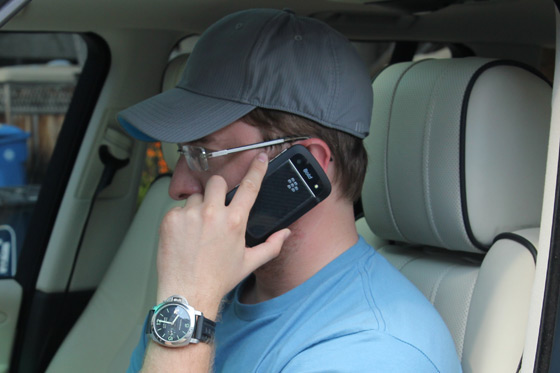 Yes, the car is parked! Phone in hand while driving is bad. Don't do it! When it comes to using the BlackBerry Bold 9900 Smartphone as a phone, it appears to handle that task just fine. Throughout testing I've had no real issues with sound quality or voice quality when talking to the people I normally talk to. My mom of all people volunteered up (without any prodding on my end) that I sounded more clear than normal, so maybe there are some subtle improvements here over previous generation BlackBerry models. ... Mothers have a way of knowing these things. The microphone pickup is a tiny slit on the front bottom right corner of the phone, the slit is on the plastic chin below the keyboard, right next to the stainless housing. As long as you hold the phone normally when talking you'll always be good to go. I did find that by kinking my neck left and sandwiching the phone between my left shoulder and left ear, it positioned the phone in such a way that I was blowing directly into the microphone which caused some loud annoyingness for the recipient on the other end. We did quite a bit of testing of the speakerphone, and found it to be pretty good. As mentioned earlier, the port for sound to come out is located on the back of the phone at the bottom of the battery door cover, but with the shape of the device its positioned in such a way that isn't blocked when lying flat. On the data front, the new hardware platform on BlackBerry 7 Smartphones now sports a 14.4 Mbps HSPA modem, which is a big jump up from the 3.6Mbps modem on BlackBerry 6 Smartphones. On the Rogers network, my homescreen no longer shows a 3G icon for activity, but rather a H+ one denoting HSPA+. Is it really a 4G BlackBerry? You're going to see the new BlackBerry 7 Smartphones get marketed different ways by different carriers. The bottom line is that there's a 14.4 modem on board, so while data will be quicker, the whole 4G vs. FauxG issue is up for debate. If you want more insight into this, check out our article on Clarifying 4G vs FauxG. Cameras / Video Recording  Hooray for HD video recording on a BlackBerry. Finally! HD Video Recording: FINALLY we have HD video recording on a BlackBerry Smartphone. The Bold 9900 records video at 720p (1280 x 720 resolution) and I've been really impressed with the quality so far. To see example HD videos recorded my the Bold 9900, check out Sample #1, Sample #2 and Sample #3. Be sure to set the video playback up to 720p for full experience. 5 Megapixel EDOF Camera: One of the only real disappointments I have on the BlackBerry Bold 9900 is the loss of autofocus functionality from the camera. We reached out to RIM to see what was up here, and got this response: The BlackBerry Bold 9900 has an always in focus 5MP camera (also known as EDOF, Extended Depth of Field) which allows for excellent image quality and it has an ultra thin footprint, which allowed us to achieve the thinnest BlackBerry smartphone to date. The EDOF camera keeps subject matter in focus while offering high quality images and 720p HD video capture. Essentially, this was a design decision that only affects the Bold 9900. Where there's a will, there's a way - I'm sure RIM could have figured out how to get it in there, but I'm guessing it was cost-prohibitive and the business decision was made to simply go with EDOF only. As for the other newly-announced BlackBerry 7 Smartphones, the new BlackBerry Torch 9810 and Torch 9850/9860 all retain autofocus. The EDOF camera still takes some great photos, including the one below I snapped on the 9900, but there are definitely times when autofocus will make for a better photo. How much this affects you is going to depend on your camera usage. I'm definitely hoping the next Bold brings back the autofocus functionality, and maybe adds a front-facing camera to the mix as well. NFC  he Bold 9900's NFC Antenna is built into the battery door. ... Clever! The BlackBerry Bold 9900 is the first BlackBerry to support NFC, or Near Field Communication, which is a short-range wireless technology (4cm or less) that allows two devices to communicate - there's always an initiator and a target. On a device like the Bold 9900, that can mean a few things, like bringing the phone close to a poster to launch an action such as downloading an app, or pairing accessories together, or even making wireless payments. RIM is committed to NFC so expect to see a lot of progress here over the months and years ahead as you start using it for more and more things. The photo above shows exactly how RIM put the NFC antenna into the BlackBerry Bold 9900. They built the antenna into the battery door! On the Bold 9900, you can turn on NFC from the homescreen by pulling down the Manage Connections menu. You'll want to start training your brain to spot the NFC logo everywhere you go.  It's an emerging standard, so much so that I couldn't find anything NFC-enabled to test the Bold 9900 out on yet while working on this review. To learn more on NFC you can read up on it here and be sure to check out the demo video we recorded of NFC in action on the BlackBerry Bold 9900 back at BlackBerry World. Other Internals - Bluetooth, GPS, WiFi , Other Sensors  I'm not sure why the Bluetooth on my Bold 9780 was shaky, but it's rock solid on the Bold 9900. Bluetooth: Bluetooth isn't something to get excited about these days -- the functionality is a given -- but I have to give props for the Bluetooth in the Bold 9900/BlackBerry 7 as it solved whatever issue me Bold 9780/BlackBerry 6 was having with Bluetooth pairing in my car. I think the issue was really specific as I could never find a solution to it (I could occassionally pair once after a battery pull, and it would never repair after that), but whatever the problem was it no longer exists with the 9900. GPS: The Bold 9900 has GPS on board, and the few tests I've done so far have found my location very quickly and very accurately. WiFi: WiFi connectivity is present in the form of Dual-Band Wi-Fi: 802.11 b/g/n at 2.4 GHz and 802.11 a/n at 5 GHz. But what about the ability to turn your BlackBerry Bold 9900 into a Mobile Hotspot? Back in early 2011, when we first saw the roadmap leak for the new lineup of phones, we saw that this functionality was on the feature list. After all, the chipset definitely supports it and we've even seen/heard of earlier builds of the BlackBerry 6.1/BlackBerry 7 OS that had the functionality built-in. We reached out to RIM on this one too, and got this for a response: Mobile Hotspot functionality is not available. Obviously there's no explanation here for us, but we can hypothesis a few scenarios: either RIM chose not to include the functionality (they tried and it just didn't work well on the BlackBerry OS), or that it's still coming but just isn't available yet, or it was ready to rock but they didn't get carrier support for it and pulled it out. I'm not sure what the story is exactly, but I'm still holding out hope that we'll see this feature get rolled out via a software update, as this leaked document from Bell shows. Other Sensors: The BlackBerry Bold 9900 includes a few other sensorts that add to the capabilities of the device, including an accelerometer for device orientation, a magnetometer that acts as a digital compass, and a proximity sensor that turns off the touchscreen display when you're on the phone. |
Subscribe to:
Posts (Atom)


